Every teacher knows the feeling: you have a science lesson on the water cycle coming up Thursday, and you need a short, illustrated story that explains evaporation in terms a seven-year-old can actually picture. You search your school library catalog, dig through Teachers Pay Teachers, and browse three different resource sites — and the closest thing you find is a story about rain that was clearly written for a different grade level and references a curriculum standard from another state.
This is not a small problem. It is the everyday reality of classroom reading material. The stories that exist were written for someone else's students, at someone else's reading level, tied to someone else's lesson plan. And for educators who want to differentiate instruction, support multilingual learners, or tackle sensitive social topics with care, the gap between what exists and what you actually need can be enormous.
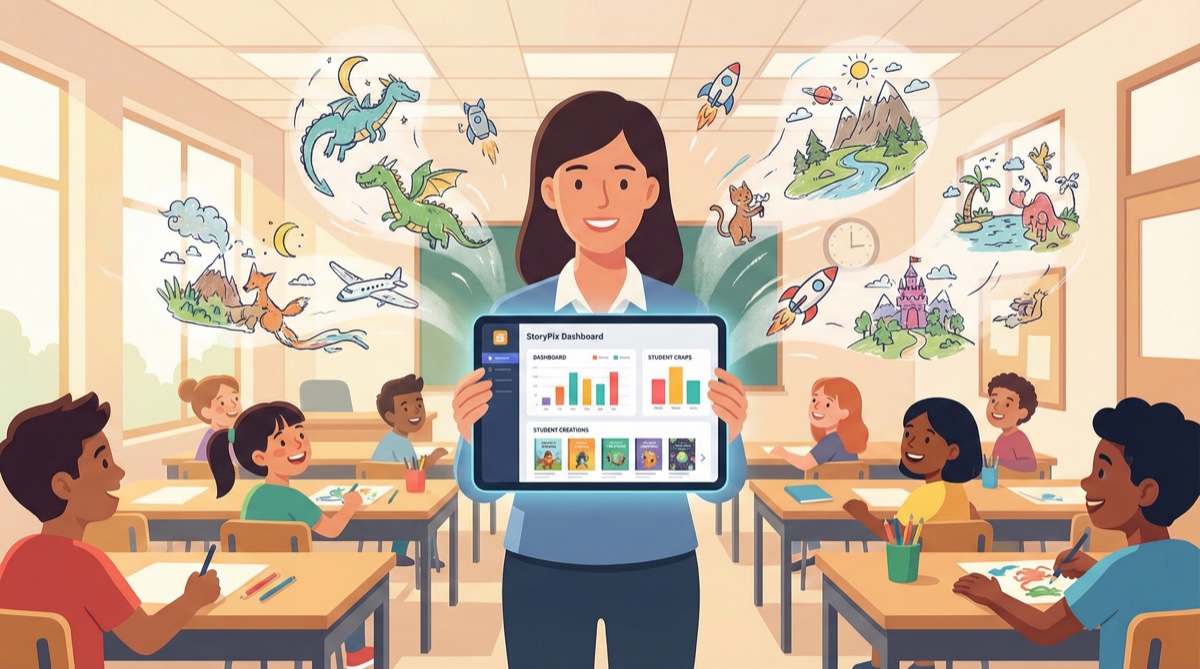
An AI story generator for teachers closes that gap. Tools like StoryPix let educators create original, illustrated storybooks in minutes — calibrated to a specific reading level, aligned to a specific curriculum topic, and tailored to the specific students sitting in front of them. This guide explains exactly how it works, when to use it, and how to get the most out of it as a classroom reading material generator.
The Real Problem with Classroom Reading Material
The shortage is not really about quantity. There are thousands of children's books and digital resources available to educators. The shortage is about specificity.
A kindergarten teacher introducing the concept of sharing needs a story where characters are five years old, the conflict is immediately relatable (one toy, two children), and the resolution models the exact behavior she wants to reinforce that week. A third-grade teacher who has a new student from another country needs a welcoming story that reflects that child's cultural background without stereotyping, at a Lexile level appropriate for the class, available by Monday morning.
Generic story libraries cannot serve these needs. Publishing timelines mean that books react to broad cultural trends, not individual classroom moments. And differentiated instruction — giving different students different reading material based on their level — requires not one story but multiple versions of the same story, at different complexity levels, sometimes in different languages.
This is where a classroom story maker powered by AI becomes a genuine instructional tool rather than a novelty.
How AI Story Generators Solve This for Educators
Modern AI story generators work differently from what most teachers imagine when they hear "AI writing." They are not simple text-completion tools. Purpose-built educational story generators like StoryPix use a structured workflow that gives teachers control over the parameters that actually matter pedagogically:
- Reading level / age group — stories calibrated to PreK-K, grades 1-3, or grades 4-6 vocabulary and sentence complexity
- Theme and curriculum topic — you specify the subject matter; the AI writes around it
- Characters — names, appearances, and personalities that match your classroom context
- Language — English, Mandarin Chinese, and expanding language support for multilingual classrooms
- Illustrations — AI-generated images generated scene by scene, appropriate to the story
The output is a complete illustrated storybook: text, visuals, and optional audio narration. It can be exported as a PDF for printing, an ePub for tablets, or a narrated video for screen time — whichever format fits your classroom setup.
ℹ️ StoryPix is currently used by parents and educators in both English-speaking and Chinese-speaking communities. The bilingual capability makes it particularly useful in dual-language programs and ESL/ELL classrooms.
5 Classroom Use Cases with Real Examples
1. Custom Reading Comprehension Material Matched to Exact Reading Levels
Differentiated reading instruction is one of the most time-consuming parts of lesson planning. Finding multiple versions of a story at different complexity levels — for the same topic, on the same week — is nearly impossible with traditional library resources.
With an AI story generator for teachers, you can create three versions of the same story in under an hour. A story about a young scientist conducting her first experiment can be written at a PreK-K level (short sentences, simple vocabulary, highly visual), a grades 1-3 level (compound sentences, tier-two vocabulary introduced in context), and a grades 4-6 level (longer paragraphs, figurative language, more complex plot structure).
All three versions cover the same core theme and can use the same comprehension questions. Students read at their level; the classroom discussion brings them together. This is differentiated instruction without the hours of manual preparation.
Example prompt to try: "A story about a young girl who uses observation and patience to solve a mystery in her backyard garden. Reading level: Grade 2."
2. Stories That Reinforce Specific Curriculum Topics
Science, math, social studies, and even physical education concepts can all be embedded into narrative form — and stories are proven to improve retention of abstract concepts compared to direct instruction alone. The problem is that topic-specific stories rarely exist at the right level of specificity.
A story that teaches photosynthesis through the perspective of a leaf watching sunlight and water transform into food is more memorable than a diagram. A counting story where a young chef adds exactly five ingredients to each pot reinforces number sense in a context children can visualize. A story about a community voting on how to use a shared garden plot introduces civic concepts in a concrete, emotionally engaging way.
With a custom stories for classroom tool, you write the curriculum objective first, then build the story around it.
Examples by subject:
- Science: water cycle, habitats, the seasons, animal adaptations
- Math: addition and subtraction, fractions as sharing, measurement concepts
- Social Studies: community helpers, maps and geography, historical perspectives
- Health/PE: handwashing, nutrition choices, physical activity benefits
💡 When generating a curriculum-aligned story, include the specific concept in your story brief. Instead of "a story about plants," try "a story that shows how plants make their own food using sunlight, water, and air." The more specific your input, the more accurate the educational content in the output.
3. Social-Emotional Learning Stories
SEL topics are among the most difficult to address with off-the-shelf materials. Books about bullying, friendship conflict, anxiety, or welcoming a new student tend to be either too abstract for young children, too heavy-handed in their messaging, or not culturally relevant to your specific classroom context.
A custom classroom story maker gives you control over all of these variables. You can write a story where the character looks like a student in your class, the setting is a school that resembles yours, and the resolution models exactly the coping strategy or social skill you are working on that month.
SEL topics well-suited to custom AI stories:
- Handling conflict with a friend without name-calling
- What to do when you feel left out at recess
- Welcoming a new student who speaks a different language
- Managing big feelings like anger or disappointment
- Taking turns and sharing limited resources
- Standing up for someone being treated unfairly
The ability to iterate quickly is especially useful here. If the first generated story's resolution feels too neat or not age-appropriate, you can adjust your input and regenerate. You retain full editorial control over the final story before using it with students.
4. Multilingual Classroom Support
In classrooms with English language learners, one of the most effective supports is access to stories in a student's home language — particularly in the early stages of language acquisition. When a child can read a story in their first language and then read the same story in English, comprehension is dramatically higher, and the emotional distance from classroom material decreases.
StoryPix generates stories in both English and Mandarin Chinese, with additional language support in development. For teachers in dual-language programs, Chinese heritage language programs, or classrooms with recently arrived students, this capability is not a convenience feature — it is a meaningful instructional support.
How to use multilingual stories effectively:
- Generate the story in the student's home language first, then generate the same story in English for comparison
- Use the bilingual version as a bridge text for students transitioning to English-dominant instruction
- Send the home-language version home to families so parents can read with their child in their strongest language
- Use bilingual stories for class-wide cultural sharing — "today we are going to read a story in two languages"
ℹ️ Research on bilingual literacy development consistently shows that strong first-language literacy supports second-language acquisition. Stories in a student's home language are not a workaround — they are a pedagogically sound instructional strategy.
5. Student-Designed Stories as Creative Writing Prompts
One of the most engaging classroom uses of an AI story generator is not generating stories for students to read — it is generating stories that students helped design. When students become story architects, they develop planning skills, narrative vocabulary, and investment in the reading process that passive reading cannot create.
The workflow is simple: students work in small groups to decide on a main character (name, appearance, personality), a setting, a problem the character faces, and how they want the story to end. They share their decisions with the teacher, who enters them into StoryPix and generates the illustrated story. The class then reads the story they helped create.
For older students (grades 4-6), you can extend this further by having them evaluate whether the AI-generated story matched their intentions, revise the input, and observe how changes to the prompt produce different narrative outcomes. This introduces basic concepts in prompt design and critical evaluation of AI output — genuinely useful digital literacy skills.
Classroom implementation ideas:
- Weekly "class story" where different student groups design each week's story
- Individual student stories as a creative writing assessment product
- Compare two stories generated from similar prompts to discuss how word choice shapes outcome
- Use student-designed characters as recurring figures across multiple stories throughout the year
How to Create a Classroom Story with StoryPix: Step-by-Step
Creating a story with StoryPix follows a structured 7-step process. Here is how each step translates to a classroom context.
Step 1: Choose your language. Select English, Chinese, or another available language. For multilingual support, you can generate the same story in both languages separately.
Step 2: Set the age group. StoryPix offers three age group settings that map directly to grade levels: Ages 3-5 (PreK-Kindergarten), Ages 6-8 (Grades 1-3), and Ages 9-12 (Grades 4-6). This setting controls vocabulary complexity, sentence length, and thematic depth.
Step 3: Choose a story theme. Enter your curriculum topic, social-emotional theme, or creative prompt. Be specific — "a story about a class working together to build a garden and learning that different jobs are all important" will produce better results than "teamwork story."
Step 4: Select a story outline. StoryPix generates three distinct story outlines based on your input. Review them and select the one that best fits your instructional goal. You can see the narrative arc before committing.
Step 5: Design your characters. Specify character names, appearances, and personalities. For classroom use, you might use a class mascot, a character type familiar to your students, or simply leave descriptions open to let the AI create diverse representation.
Step 6: Generate illustrations. The AI generates illustrations for key scenes in the story. Review each one and regenerate any that do not fit your classroom context. All illustrations are age-appropriate by default.
Step 7: Export your story. Choose your format — PDF for printing and distributing physical copies, ePub for reading on tablets, or narrated video for screen time. The PDF format is particularly useful for reading comprehension worksheets where you want students to annotate the text.
💡 For printing classroom sets, the PDF export is formatted to work as a simple booklet. Print double-sided and fold to create individual take-home copies — a concrete, tangible story that families can read at home reinforces the classroom lesson.
Ready to create your first classroom story? It takes about 15 minutes from a blank prompt to a finished illustrated storybook.
Try creating a classroom story with StoryPix
Practical Tips for Teachers
Match age group settings to your grade level precisely. The "Ages 3-5" setting is calibrated for emergent readers — very short sentences, high-frequency vocabulary, heavy reliance on illustration to carry meaning. The "Ages 6-8" setting introduces more complex sentence structures and assumes basic decoding skills. The "Ages 9-12" setting supports fluent readers engaging with more nuanced themes. Using the wrong setting is the most common cause of a story feeling "off" for a particular class.
Use custom themes to align directly with lesson plans. Do not think of StoryPix as a general story generator. Think of it as a curriculum material creator. Before opening the tool, write one sentence describing the educational objective you want the story to serve. Use that sentence as your story theme input.
Save character descriptions for recurring stories. If you create a class mascot — say, a curious brown rabbit named Pepper who loves asking questions — write down the full character description you used. Reusing the same character description in future stories creates a consistent recurring character that students recognize and connect with. Recurring characters are one of the most effective tools for building a classroom reading culture.
Use the video export for screen time and accessibility. The narrated video export includes audio narration of the story text. This is particularly valuable for students who are still developing decoding skills, for students with reading disabilities, and for multilingual learners who benefit from hearing correct pronunciation while following the text. Playing the story on a classroom projector before distributing printed copies combines auditory and visual input — a multi-modal approach with strong research support.
Generate multiple story versions before class. Because story generation takes only a few minutes, it is practical to generate two or three versions of a story — different outlines, different characters, slightly different themes — and choose the best one before class. This is much faster than finding and evaluating pre-existing materials.
Cost Considerations for Educators
StoryPix offers a free tier that gives educators access to the full story generation workflow with no credit card required. The free plan is sufficient for trying the tool, exploring its capabilities, and generating your first few classroom stories.
For educators who want to create stories regularly — weekly, or for multiple classes — the paid plans provide a meaningful number of story credits per month at a price point comparable to a single purchased classroom book.
ℹ️ Visit the [StoryPix pricing page](/pricing) for current plan details. Individual educator accounts can be created immediately. If you are interested in school-level or district-level access for multiple teachers, contact the StoryPix team directly to discuss options.
One way to think about the value calculation: a single purchased picture book with classroom rights costs $15-30 and serves one topic at one reading level. A single AI-generated classroom story costs a fraction of that, can be created on-demand for any topic, and can be regenerated at a different reading level immediately. For educators managing differentiated instruction across multiple subjects, the economics shift substantially in favor of custom AI generation.
It is also worth noting that unlike subscription-based curriculum platforms, StoryPix does not require a multi-year contract or administrator approval for an individual teacher to start using it. A teacher can sign up, generate a story, evaluate its quality, and decide whether it fits their practice — before spending a dollar.
Frequently Asked Questions
Can I use AI-generated stories commercially, for example in a classroom library or as a published school newsletter?
Stories generated with StoryPix are for the personal and educational use of the account holder. For classroom use — distributing printed copies to students, projecting on a classroom screen, sharing with families — this falls comfortably within educational use. If you have questions about specific use cases like publishing in a district newsletter or using in a for-profit tutoring context, review the StoryPix terms of service or contact the team directly.
How do I know the content is age-appropriate and safe for classroom use?
StoryPix is built specifically for children's story generation, with age-appropriate content filtering applied at both the story generation and illustration stages. The age group setting you choose at the start of the workflow calibrates the content accordingly. That said, teachers should review any AI-generated content before using it with students, just as you would preview any media before showing it in class. The platform is designed for child-appropriate output, but teacher review is always good practice.
Can I edit the story after it is generated?
Yes. After generation, you can review the full story text and request changes to specific scenes or sections before finalizing. You can also regenerate illustrations for individual scenes that do not fit your needs. The workflow is designed to give educators editorial control at each step, not just produce a fixed output.
What if I need a story on a very specific topic — like a story that explains what a denominator is, or a story set during the Chinese New Year?
Specificity is where AI story generators perform best. The more specific your input, the more targeted the output. A prompt like "a story where two children are sharing a pizza and learn what the bottom number of a fraction means by counting the equal slices" will produce a story far more useful than a general search for "fraction stories for kids." Cultural events, historical figures, scientific concepts, geographic settings — all of these work well as story inputs. If a first generation is not quite right, refining the prompt and regenerating usually produces the result you need within two or three attempts.
Conclusion
The classroom reading material problem is not going away — if anything, differentiated instruction, multilingual classrooms, and the demand for culturally relevant curriculum are making it more acute. Pre-written stories from general-purpose libraries were never a complete solution. They were a compromise.
An AI story generator for teachers is not a replacement for great children's literature. The books that have shaped generations of young readers belong in every classroom, and no generated story will replace them. But for the specific, timely, differentiated, curriculum-aligned reading material that teachers need on a Tuesday morning for a lesson happening Thursday — AI generation is not just a convenience. It is a genuinely better tool than what existed before.
StoryPix is built for exactly this use case: a structured workflow that gives educators control over the parameters that matter, outputs a complete illustrated story in minutes, and exports in formats that work in real classroom settings. Whether you are a first-grade teacher building reading comprehension skills or a fifth-grade teacher introducing complex social-emotional themes, the same core process applies.
Create your first classroom story free with StoryPix — no credit card required.
Further reading:
- How to Create a Personalized Children's Book with AI — full step-by-step tutorial with screenshots
- Best AI Story Generators for Kids in 2026 — tool comparison to help you evaluate your options
- What Is an AI Story Generator? — a beginner-friendly intro for educators new to AI tools
- Best AI Tools for Bilingual Children's Stories — ideal for multilingual classrooms
- Free vs Paid AI Story Generators — understand the budget implications for educators
- AI Story Generator: The Complete Parent's Guide — detailed walkthrough of the 7-step creation process